


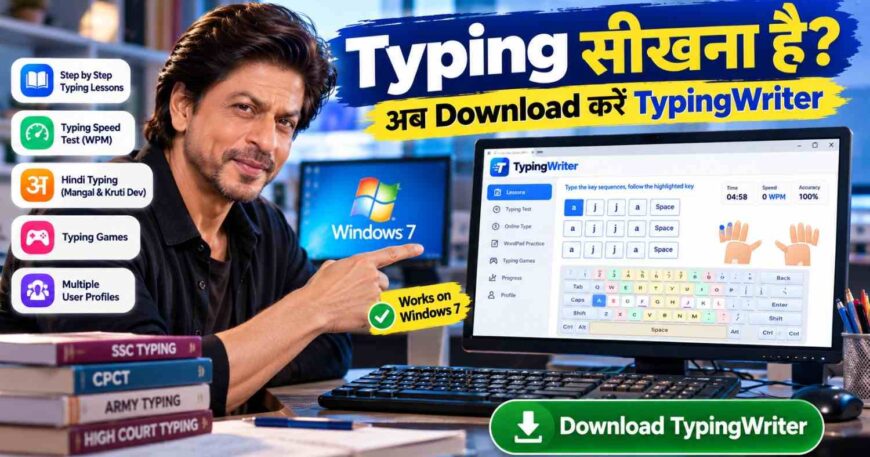
Many students, shops and offices still use older computers running Windows 7. If you are one of them, you may have found that many new typing apps need a newer system or a constant internet connection. This guide explains what to look for in typing software for Windows 7 and why TypingWriter is a good choice for learning English typing and Hindi typing on a PC.
What to Look for in Typing Software for Windows 7
Download Now (Typing Writer)👉 – Click here to Download
A good typing tutor for an older PC should have:
- Step-by-step lessons, starting with the home row, so beginners learn touch typing correctly.
- An on-screen keyboard that shows the next key and which finger to use.
- Typing tests with WPM and accuracy, so you can measure progress.
- English and Hindi support, including Kruti Dev and Mangal, for students preparing for exams.
- Offline use, so you can practice without Wi-Fi.
- A simple, light design that runs smoothly on older computers.
Why TypingWriter Is a Good Typing Software for Windows 7
TypingWriter is a typing learning software built by Synosky Technologies. It brings lessons, tests and games into one app:
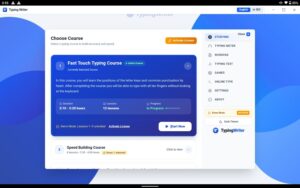
- Touch typing course: the Fast Touch Typing Course starts with the home row and builds up through key, word, sentence and paragraph drills of 3 to 5 minutes each.
- On-screen keyboard and hand guide: the next key lights up and a hand picture shows which finger to use.
- Hindi typing course: learn Hindi typing in Mangal and Kruti Dev on the Remington Gail layout, with Hindi characters shown on the keyboard.
- Typing tests: practice with exam-style passages for CPCT, SSC, Army and High Court, and see your WPM and accuracy live.
- Online Type: quick 15, 30, 60 and 120 second tests.
- WordPad practice: type from your own book with a timer and live results.
- Typing games: Cyber Racer, Word Bomb, Space Defender, Bubbles, WordTris and Clouds.
- Multiple users: each student gets a profile with separate progress, which helps in computer labs and coaching centres.
Download TypingWriter for Windows and start with the free lessons. You can read more about the software on typingwriter.com or see the pricing page.
How to Download and Install Typing Software on Windows 7
- Open the TypingWriter download link and save the setup file.
- Double-click
TypingWriterSetup1.1.0.exeto start the installer. - Follow the steps on screen and finish the installation.
- Open TypingWriter and enter your name to create a profile.
- Choose the English or Hindi course and press Start Now.
If you use a 32-bit or older Windows 7 computer, test the setup file on that machine before you roll it out to many PCs.
A Quick Safety Note for Windows 7 Users
Microsoft ended support for Windows 7 in January 2020, which means it no longer gets security updates. If you keep using it:
- Only download software from the official website.
- Keep your antivirus updated.
- Avoid opening unknown email attachments.
- Plan to move to a newer version of Windows when you can. You can read about the current versions on the Microsoft Windows page.
How to Improve Your Typing Speed on Windows 7
1. Start with the home row
Place your fingers on A S D F and J K L ; and learn the keys slowly. Do not rush into speed tests.
2. Aim for accuracy first
Type correctly at a slow pace, then increase your speed. Aim for at least 95% accuracy.
3. Practice 20 to 30 minutes every day
Short daily practice beats one long weekend session.
4. Take a weekly typing test
Note your WPM and accuracy each week to track progress.
5. Practice the right font and layout
For Hindi typing exams, check whether the exam uses Kruti Dev or Mangal and practice in that setup.
What Is a Good Typing Speed?
| Level | English typing | Hindi typing |
|---|---|---|
| Beginner | 15–25 WPM | 10–20 WPM |
| Average | 30–40 WPM | 20–30 WPM |
| Good | 40–60 WPM | 30–40 WPM |
| Excellent | 60+ WPM | 40+ WPM |
Check the latest notification for your exam, because speed requirements change. You can learn how speed is measured in the words per minute article.
TypingWriter vs Other Typing Software
When you compare typing programs, check these points:
| What to check | Why it matters |
|---|---|
| English and Hindi in one app | Saves you from using two programs |
| Kruti Dev and Mangal | Needed for many government exam tests |
| Exam-style passages | Gives you real test practice |
| On-screen keyboard and finger hints | Builds proper touch typing |
| Multiple user profiles | Useful for classes and coaching centres |
| Light desktop app | Works better on older computers |
TypingWriter covers all of these in one download. If you are looking for a Typing Master alternative, it is worth testing the free demo.
Frequently Asked Questions
Which is the best typing software for Windows 7?
Choose software with step-by-step lessons, an on-screen keyboard, live accuracy and tests. TypingWriter offers these for both English and Hindi.
Is there a free typing software download for Windows 7?
Yes. TypingWriter has a free demo with the first lessons. You can download it here.
Can I learn Hindi typing on Windows 7?
Yes. TypingWriter has a complete Hindi typing course in Mangal and Kruti Dev with the Remington Gail layout.
Does typing software work offline?
Lessons, WordPad and games run in the desktop app. Online Type and updates may need an internet connection.
How long does it take to learn typing?
Most beginners reach 25 to 30 WPM in four to six weeks with daily practice.
Can I use it in a computer lab or coaching centre?
Yes. TypingWriter supports multiple user profiles, so each student keeps their own progress.
Final Words
If you are searching for typing software for Windows 7, pick a program that teaches touch typing in the right order, shows your progress, and supports both English and Hindi. Download TypingWriter, start the free lessons, and visit typingwriter.com to learn more. Built by Synosky Technologies.
